This guide is for artists at any stage who want their work discovered by more people online.
Pinterest made several meaningful changes in 2025 that reshaped how the platform works for artists, not dramatically, but in ways that directly impact how artwork gets discovered. Pinterest for artists is real in 2026.
Whether you paint watercolors at your kitchen table, throw ceramics in a backyard studio, or create digital illustrations between shifts, if you’re using Pinterest (or thinking about it) as part of how you share and sell your art, these updates matter. If you’re brand new to Pinterest, start with my beginner’s guide to Pinterest marketing for artists for the foundation, then these 2025 updates will slot right into place.
When you understand how Pinterest works, you stop posting into the void and start building something that grows over time. For the complete step-by-step guide to putting these principles into action, read: How to Sell Art on Pinterest: A Practical Guide for Artists.
This post breaks down the five most important changes, what they mean in simple terms, and how to apply them, even if you’re brand new to Pinterest.
1. Smarter Visual Search: Pinterest Can Now See Your Art
What changed: Pinterest has significantly improved its ability to recognize what’s actually in an image, not just the words attached to it.
Pinterest uses computer vision and deep learning to identify textures, colors, shapes, and objects within a photo. For example, if a user photographs a painting they spotted at a gallery, Pinterest can now find visually similar artwork across the platform, even without a single keyword. Pinterest Lens is one of the key technology components driving Pinterest’s image recognition.
What this means for you as an artist:
You don’t need to over-explain your work in long captions. For instance, a clear, well-lit, true-to-color image of your artwork now carries more weight for Pinterest discovery than ever before. This is a significant shift: your artwork itself is becoming a keyword.
Your artwork itself is becoming a keyword.
Beginner action step: Before pinning, try photographing your work in natural light (or with consistent studio lighting), avoiding heavy filters that shift colors. A sharp, true image of your painting, sculpture, or illustration gives Pinterest’s visual search the best chance to match it with the right audience.
2. Video Pins and Process Content: Show Your Work in Motion
What changed: Pinterest has expanded its support for video and has been actively encouraging creators to share content that shows movement, process, and transformation, not just finished results.
You’ll see this reflected in:
- Short-form video Pins
- Process-based content (time-lapses, step-by-step clips)
- Demonstration and “how it’s made” style posts
What this means for you as an artist:
Process is no longer secondary content, it’s strategic content. You don’t need expensive video equipment. A phone propped up on a stack of books, recording your brush on canvas, is enough to start.
Consider showing:
- The blank canvas or raw material before you begin
- A key turning point, when the color shifts, when the form emerges
- The layering or texture-building process
- The finished piece displayed in a real space (a wall, a shelf, a table)
This helps a viewer move from noticing your work → connecting with your process → imagining it in their own life → wanting to own it.
Beginner action step: Film one 30–60 second clip of your next creative session. It doesn’t need to be narrated or edited. Pin it with a simple description like “Watercolor florals, building layers from light to dark.” That’s a complete, effective video Pin.
3. Board Strategy: Your Boards Are SEO Containers, Not Just Collections
What changed: Pinterest has become more active in grouping related content together using what it calls a “Taste Graph”, essentially an internal map of interests, aesthetics, and visual styles. Think of ‘clusters’ that are related by their topics. Pinterest uses this to understand not just what a Pin shows, but who it’s for and where it belongs in search.
What this means for you as an artist:
Your boards aren’t just a place to save pretty things. Pinterest reads your board names, descriptions, and the Pins inside them as signals about what you create and who your audience is.
A board named “My Art” tells Pinterest very little. A board named “Original Watercolor Botanicals for Sale” or “Abstract Acrylic Paintings Pacific Northwest” tells Pinterest exactly who might be searching for your work. For board naming examples specific to your art medium, read: The Board Starter Guide: A Simple Way to Build Pinterest Boards That Actually Get Found.
Keywords that artists can weave into board names and descriptions:
- “Original art for sale”
- “Handmade [medium] art”
- “Art prints for the home”
- “[Your style] paintings”
- “Commission a painting”
Beginner action step: Review your existing boards. Do their names describe what’s inside in simple searchable terms? In not, rename any vague boards to something a potential buyer might actually type into Pinterest search. Then check to make sure the Pins inside each board actually match that theme.
For a complete breakdown of how keywords work across your entire Pinterest account, not just boards, read Pinterest SEO for Artists: How to Get Your Work Found.
👉 If your boards are still named things like ‘Art’ or ‘Inspiration,’ The Board Starter Guide shows exactly how to fix that.
4. Multi-Page Pins: Guide Someone Through Your Work
What changed: Pinterest evolved what were once called “Story Pins” (later “Idea Pins”) into a more flexible multi-page Pin format (a.k.a carousel Pins) with better analytics, stronger linking capabilities, and scheduling tools.
These are still underused, especially by artists.*
What this means for you as an artist:
A multi-page, or carousel, Pin lets you guide someone through your artwork like a mini-story. Instead of showing just the finished piece, you can walk a viewer through:
- Page 1: The concept or inspiration
- Page 2: Early sketching or underpainting
- Page 3: Mid-process — the messy, interesting part
- Page 4: The finished work, in context
Carousel Pins help build a deeper connection than a single image ever could. For artists looking to sell, that connection is often what moves someone from admiring your work to buying it.
Beginner action step: Next time you complete a piece, photograph it at 3–4 stages. Combine those into a multi-page Pin. In the text fields, write a sentence or two at each stage, keep it conversational, like you’re texting a friend about what you’re making.
*At the time of this writing Carousel pins can be created on Pinterest desktop and without running an ad.
5. Shopping Tools: Pinterest Supports the Full Journey from Discovery to Purchase
What changed: Pinterest has continued building tools that connect your content directly to commerce, including:
- Product tagging — link directly to your shop from within a Pin
- Conversion tracking — see which Pins are driving real clicks and sales
- Performance analytics — understand what’s working and what isn’t
What this means for you as an artist:
Pinterest is built for the way people shop for art, they save, they come back, they compare, they imagine. Unlike Instagram or TikTok, content on Pinterest can keep driving traffic to your shop or website for months or even years after you post it.
With product tagging, you can attach a direct link to your Etsy listing, your website, or your print shop right inside the Pin. A viewer sees your painting → taps the tag → lands on your shop. That’s a direct path.
Beginner action step: Connect your website or Etsy shop to your Pinterest business account. Then, the next time you Pin a piece that’s for sale, add a product tag. You don’t need to tag every Pin, start with your top 5 most-loved pieces and see what the analytics tell you.
Discover how to tag your products in Pins, here.
Pin to your Art Marketing or Pinterest for Artists boards for later ⤵️
A Real Example: Applying A Pinterest for Artists Strategy (2026)
Now it’s time to bring this all together with a sample walkthrough. For example, we’ll use botanical watercolor paintings. But whether you work in oils, acrylics, ceramics, or collage, the steps are exactly the same.
The artist: You paint botanical watercolors, florals, leaves, herbs, garden studies. Your work is detailed, nature-inspired, and painterly. People who love your style are already on Pinterest every day searching for it.
Step 1: Set Up a Focused, Keyword-Rich Board
Create a board called: “Original Botanical Watercolor Paintings” (remember to keep Board titles 50 characters or fewer)
This board name does three things at once:
- Tells Pinterest what the content is (botanical, watercolor)
- Signals it’s original art, a phrase buyers actively search
- Gives your work a clear home that Pinterest can categorize and place correctly
In the board description, write 2–3 sentences in plain language, using terms someone might actually search: “Original botanical watercolor paintings of flowers, herbs, and garden plants. Soft, layered color on cold press paper. Available as originals and fine art prints.”
That’s it. No need to be clever, be clear and searchable.
Step 2: Pin Your Artwork With Strong Visuals
When you photograph your botanicals to Pin, aim for:
- Natural light — watercolors especially need honest, even light to show the transparency and layering. A north-facing window on an overcast day is ideal
- Multiple images of the same piece — a full flat-lay of the whole painting, a close-up of a petal or leaf where the detail shows, and the piece propped or framed in a real space
- True color — if your poppies are a particular coral-red, your photo needs to capture that accurately. Pinterest’s visual search indexes color, and buyers are often searching by palette
Pin each image as a separate Pin to maximize discovery opportunities, potentially showing up in different searches.
Step 3: Create a Simple Process Video
Film a 30–60 second clip showing your botanical process:
- A light pencil sketch of the stem and flower shapes
- First wet washes — the pale underpainting
- Building layers and deepening the color
- Final detail work — veining on a leaf, the center of a bloom
You don’t need editing software. Film it on your phone, trim it, and post it as a video Pin to the same board.
In the Pin description, write something like: “Painting a botanical watercolor from sketch to finished piece, building soft layers of color on cold press paper.” Simple, human, and full of searchable terms.
Simple, human, and full of searchable terms.
Step 4: Use Multi-Page Pins to Tell the Story
Take the photos from Step 2 and create a multi-page Pin:
- Page 1: Your pencil sketch — the beginning
- Page 2: First washes of color on the paper
- Page 3: The piece mid-development — where the form and depth start to emerge
- Page 4: The finished painting, available in your shop (add your link here)
Add one sentence per page in your own voice: “This is where I start to see whether the composition is working” or “The hardest part is getting the shadows right without losing the softness.” This kind of honest, personal narration builds connection. It’s also what moves someone from admiring your work to wanting to own it.
Step 5: Check Your Analytics Monthly (Don’t Skip This)
After a month of pinning, open your Pinterest Analytics (available on all free business accounts) and look for:
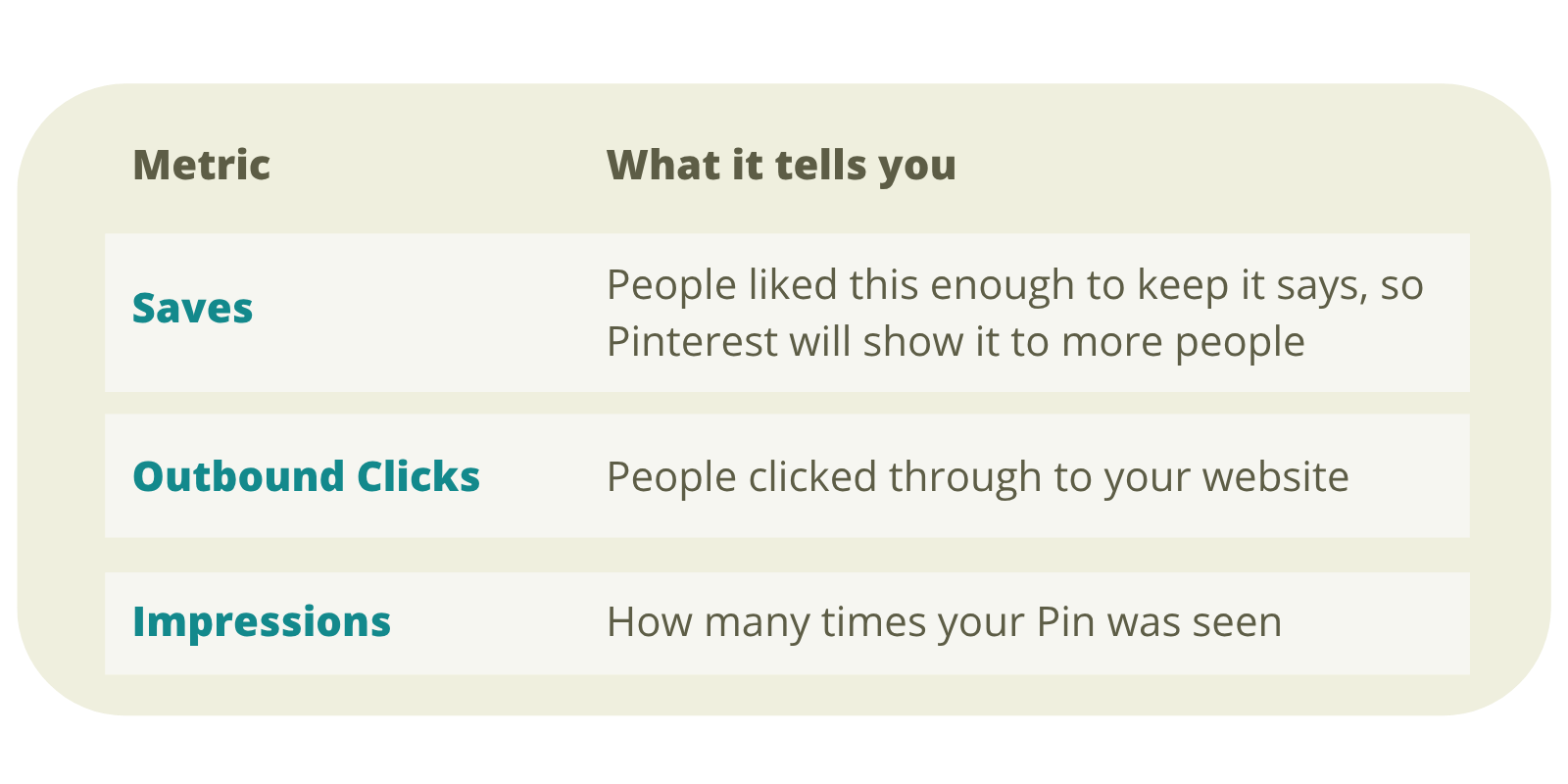
Your goal is to notice what’s generating saves and outbound clicks, those are your best-performing Pins. Make more content in that vein.
For example: A close-up of delicate leaf detail might outperform a full painting view. A soft, muted palette might save more than a vibrant one. Let the data show you what your audience responds to then trust it.
Let the data show you what your audience responds to then trust it.
You don’t need to post every day. Three to five quality Pins per week, posted consistently, will build steady traction. Pinterest rewards patience and consistency far more than volume.
Optimize your Pinterest Business Account with the Seven Steps, a good place to start if you are just getting started on Pinterest.
Why This Matters for Artists in 2026
Pinterest’s 2025 updates weren’t chasing trends. They were about understanding — helping the platform better match creative work to the people already searching for it.
Artists who are seeing steady, sustainable growth on Pinterest right now share a few habits:
- Clear, keyword-named boards
- Strong, well-lit images
- A mix of finished work and process content
- A product tag or link on any piece that’s for sale
- Regular (not constant) posting
When you’re just starting out, you don’t need to use every feature or post daily. You simply need to align your work with how Pinterest sees and organizes content.
A Final Thought
If you’re an artist just starting with Pinterest, the most important thing to remember is this: Pinterest is a search engine, not a social feed.
People aren’t casually scrolling past your work the way they do on Instagram. They’re searching for art like yours; for their walls, as gifts, as inspiration. They’re already looking.
Your job is simply to make your work findable. Start with one board rename and one new Pin this week and watch what happens.
Start with Pinterest SEO for Artists, it walks you through every location where keywords belong and how to use them naturally.
When Pinterest understands what you create and who it’s for, it places your work in front of the people who are already looking for it. That’s not luck. That’s strategy.
Glossary
SEO is how you help Pinterest (or Google) understand what your content is about, so it can show your work to the right people. Think of it like labeling a filing cabinet. If your folder is labeled “Abstract Ocean Paintings” the right person finds it instantly. If it’s labeled “My Stuff,” it gets lost. On Pinterest, SEO happens through your board names, Pin titles, descriptions, and even the image itself. When those things use words your ideal buyer is actually searching for, Pinterest connects the two of you.
Outbound Clicks: An outbound click is when someone sees your Pin and clicks through to leave Pinterest, landing on your website, Etsy shop, or wherever your link points. This is one of the most important numbers in your Pinterest analytics, because it means someone was interested enough to take action. They didn’t just scroll past or just save it. They continued their search for more.
Taste Graph is Pinterest’s internal map of what goes with what, connecting visual styles, interests, aesthetics, and audiences. It’s how Pinterest “knows” that someone who saves minimalist Scandinavian interiors might also love neutral-toned abstract prints. Or that someone collecting botanical illustration Pins is likely interested in handmade art prints. You never see the Taste Graph directly. But it’s working behind the scenes every time Pinterest decides which Pins to show someone on their home feed or in search results.
Indexing is the process of Pinterest (or Google) reading, categorizing, and filing away your content so it can be retrieved in search results later. When you publish a Pin, Pinterest doesn’t immediately show it to everyone. It first indexes it, analyzing the image, reading the title and description, noting which board it lives on, and deciding where it fits in the larger system. Think of it like a librarian cataloguing a new book. Until it’s properly catalogued, no one can find it on the shelf.