Pinterest is a powerful tool for artists; you’ve probably heard that by now. But most of the advice out there is written for bloggers and product sellers, not for painters, illustrators, ceramicists, or anyone whose work itself is what they’re selling.
This guide is different. It’s written specifically for artists and creative business owners, with practical steps, real examples, and honest explanations of how Pinterest actually works, so you can build a strategy that fits the way you create.
How do you sell art on Pinterest?
To sell art on Pinterest, optimize your profile with relevant keywords, create keyword-rich boards organized by art type or topic, and publish vertical Pins that link directly to your website, shop, or portfolio. Pinterest works as a discovery engine — it drives consistent traffic over time when you Pin regularly with clear, descriptive titles and descriptions. Focus on getting visitors to your website or email list, where the actual sale happens.
Why Pinterest Works for Selling Art
Pinterest isn’t a social media platform in the traditional sense. It’s a visual search engine, closer to Google than Instagram. When someone types “botanical watercolor print” or “handmade ceramic mug” into Pinterest, they’re not browsing friends’ posts. They’re actively looking for something. That’s the difference.
For artists, this is significant. It means:
- People can find your work without you having a large following
- Pins continue to surface in search results months or even years after you publish them
- The people finding your work are often already in a buying or browsing mindset
The goal isn’t to go viral. The goal is to be consistently findable by the right people, such as, art collectors, home decorators, and interior designers, and to give those people a clear path to your website, your shop, or your email list.
Before your first Pin goes live, your Pinterest account needs to be set up to do the work for you. Think of it as laying the foundation; the stronger it is, the better everything built on top of it performs. Here’s where to start.
Step 1: Set Up a Pinterest Business Account That Works for You
Your profile is the first thing Pinterest reads to understand who you are and what you offer. Before you Pin a single image, these three elements need to be in place; they do the heavy lifting so your content can do its job.
1-Switch to a Business Account:
If you’re using a personal account, convert it to a Business account (free) via Pinterest’s business account setup page. This gives you access to Pinterest Analytics, keyword research tools, and the ability to claim your website, all of which matter for growth.
2-Write a Keyword-Rich Bio:
Your bio has about 160 characters. Use them intentionally. Don’t just write “Artist based in [city].” Instead, try something like:
“I help art lovers find original botanical watercolors and art prints for their homes. Shop my work or learn Pinterest marketing for your own creative business at friedacreates.com.”
Include your primary keywords naturally: “art prints,” “original watercolors,” “sell art online”; but write it for a human first.
3-Claim Your Website:
Claiming your website connects your domain to your Pinterest account, which signals authority to Pinterest’s algorithm and helps your Pins rank better in search. You’ll do this through your Business account settings — most platforms (Squarespace, Shopify, WordPress) have a simple verification step.
For more on profile optimization, see: Pinterest SEO for Artists: How to Get Your Work Found
Step 2: Create Boards That Attract the Right Audience
Your boards are how Pinterest understands what your account is about. Think of each board as a chapter in a book, together, they tell Pinterest and your visitors exactly who you are and what they’ll find.
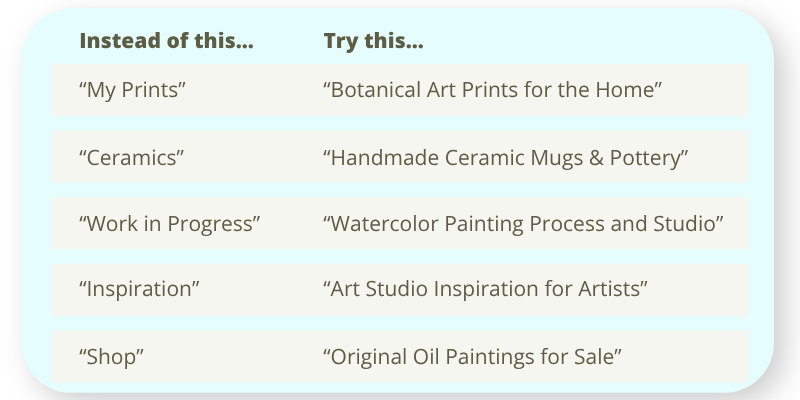
Board naming strategy: Use keyword phrases your ideal buyer or fan is actually searching for, not internal studio labels.
How many boards do you need? Start with 5–8 focused boards. It’s better to have fewer boards with strong, consistent content than a dozen boards that are sparsely populated or unfocused.
Board descriptions matter. Pinterest reads your board descriptions for keyword context. Use the full character limit (up to 500 characters) and write naturally to describe what’s contained within the board and who it’s for. Keyword stuffing is outdated and is interpreted as spam.
For a deep dive on board strategy, read: The Board Starter Guide: A Simple Way to Build Pinterest Boards
Step 3: Create Pins That Get Found AND Clicked
This is where most artists get stuck. You take a beautiful photo of your work, upload it, and… nothing happens. Here’s what’s usually missing.
These are the ingredients of a Pin that performs:
1-A destination URL that delivers — Every Pin should link somewhere specific: a piece of work, a product or portfolio page, a blog post, a landing page. Never your homepage.
2-Vertical image — Pinterest’s recommended ratio is 2:3 (1000×1500px). Vertical Pins not only take up more screen space, they are Pinterest’s preferred dimension. Plus, 85% of Pinterest users are on mobile, this vertical imagery fits better.
3-Clear, readable text overlay — Add a short title or phrase directly on the image. People scroll fast; give them a reason to stop, especially if you’ve created an art tutorial or an in-situ setting.
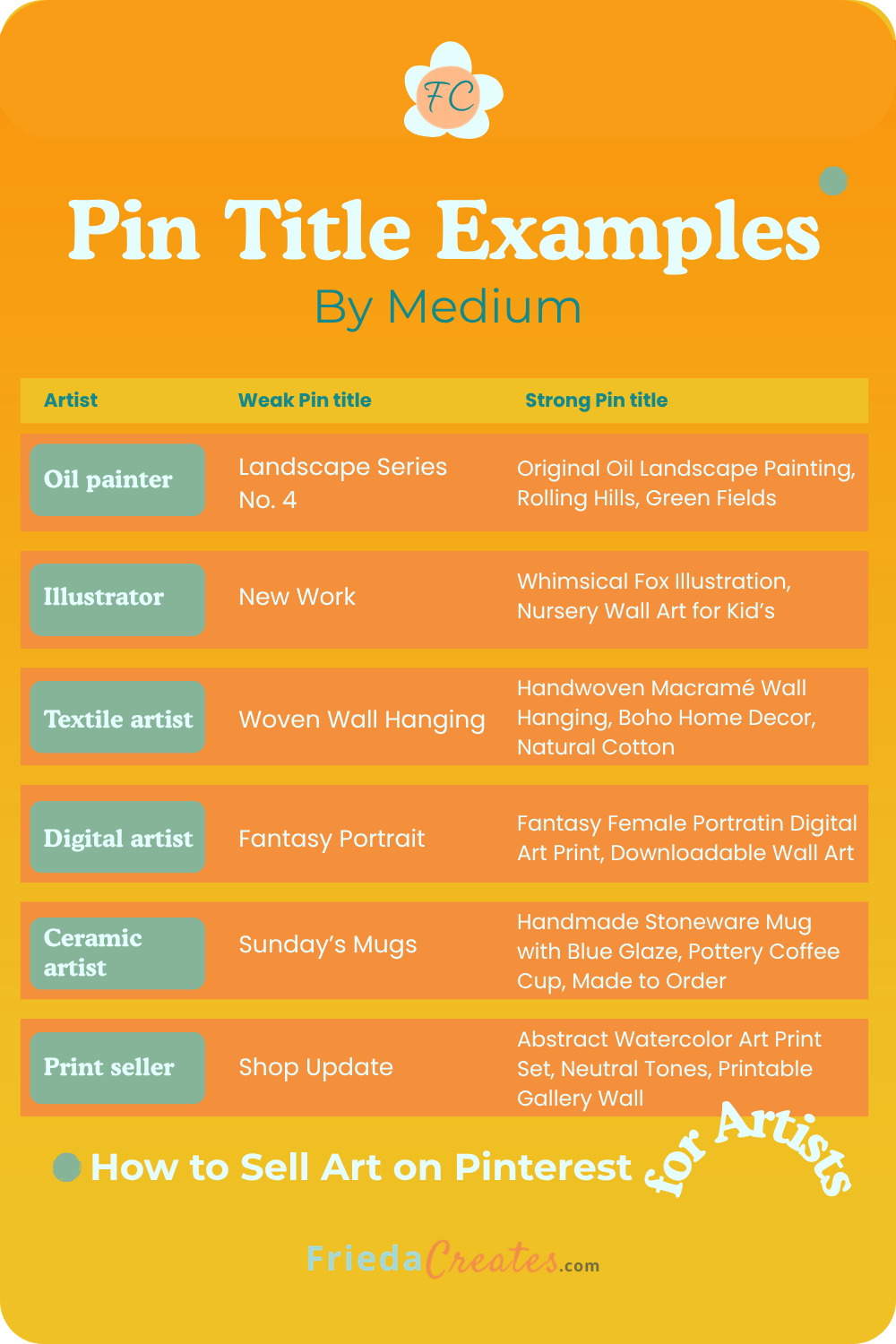
4-Keyword-rich Pin title — This is one of the most important SEO (search engine optimization) elements on a Pin. Resist writing “New Print Available”. Be descriptive: write “Botanical Wildflower Art Print; Watercolor Wall Art for Living Room.”
5-Descriptive Pin description — Use 2–3 sentences. Include your primary keyword phrase naturally. Describe the artwork, who it’s for, and what they’ll find when they click.
Pin title examples by medium.
Save for Later ⤵
Step 4: Link Every Pin to a Page That Converts
First, Pinterest drives traffic to your website, and then it converts that traffic. These are two separate jobs that both need to work.
What to link to:
- Your artwork or product pages — If you sell prints, originals, or commissions, link directly to the specific item or collection, not your homepage.
- Your portfolio — If you take commissions, link to a page that explains your process and includes a contact form or inquiry button.
- Your blog posts — Content that educates (how you made something, the story behind a piece, a guide to caring for art or framing) builds trust and keeps visitors on your site longer.
- Your email list opt-in — This is often the highest-value destination. Getting someone on your list means you can follow up, share new work, and build a relationship that outlasts any algorithm.
The Pinterest-to-sale path looks like this:
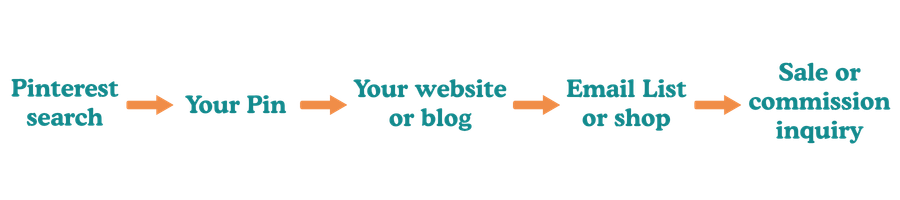
Pinterest rarely converts directly to a sale (though it does happen). Think of it as the top of your funnel, which is discovery. Your website is where the relationship deepens.
Step 5: Pin Consistently and Think Long-Term
Pinterest rewards consistency. The platform’s algorithm, which uses something called a Taste Graph, learns what your account is about based on what you Pin over time. The more consistent and focused your content, the better Pinterest gets at showing your Pins to the right people.
What “consistent” actually looks like:
- 3–7 Pins per week is a solid, sustainable pace for most artists
- Mix your own content (your art, your blog posts) with a small amount of curated content that’s relevant to your niche
- Space out the posting of your Pins rather than publishing them all on one day; use a scheduler like Tailwind or Pinterest’s built-in scheduler
Fresh content vs. repinning:
Pinterest currently prioritizes fresh Pins, meaning new images, even when they link to content that already exists on your website. This is good news for artists because it means you don’t need to constantly create new artwork to stay active on Pinterest. A new image of the same painting, such as a different crop, different background, different text overlay, or color treatment, counts as a fresh Pin and gets a new distribution push from the algorithm.
What this means practically: one blog post or one artwork can support multiple Pins over time. A botanical watercolor painting could generate a Pin featuring the finished piece, a Pin showing a detail shot, a Pin with a lifestyle mockup on a living room wall, and a Pin with a text-led design linking to the same shop page. Four fresh Pins, one piece of content. That’s how consistent artists build Pinterest momentum without burning out.
Step 6: Use Keywords Like a Search Engine Optimizer (Even If You’re “Just an Artist”)
The artists who get the most traction on Pinterest aren’t necessarily the most talented; they’re the ones who understand how people search.
Where to use keywords on Pinterest:
- Profile name and bio
- Board titles and descriptions
- Pin titles
- Pin descriptions
- Alt text on images (set this on your website before the image goes to Pinterest)
- Your website’s page titles and meta descriptions (Pinterest reads these when your site is claimed)
How to find the right keywords: Type a phrase into the Pinterest search bar and watch the autocomplete suggestions. These are real search terms. For example, type “watercolor art” and you might see: watercolor artwork, watercolor art ideas, watercolor art for beginners, watercolor art landscape, watercolor art paintings.
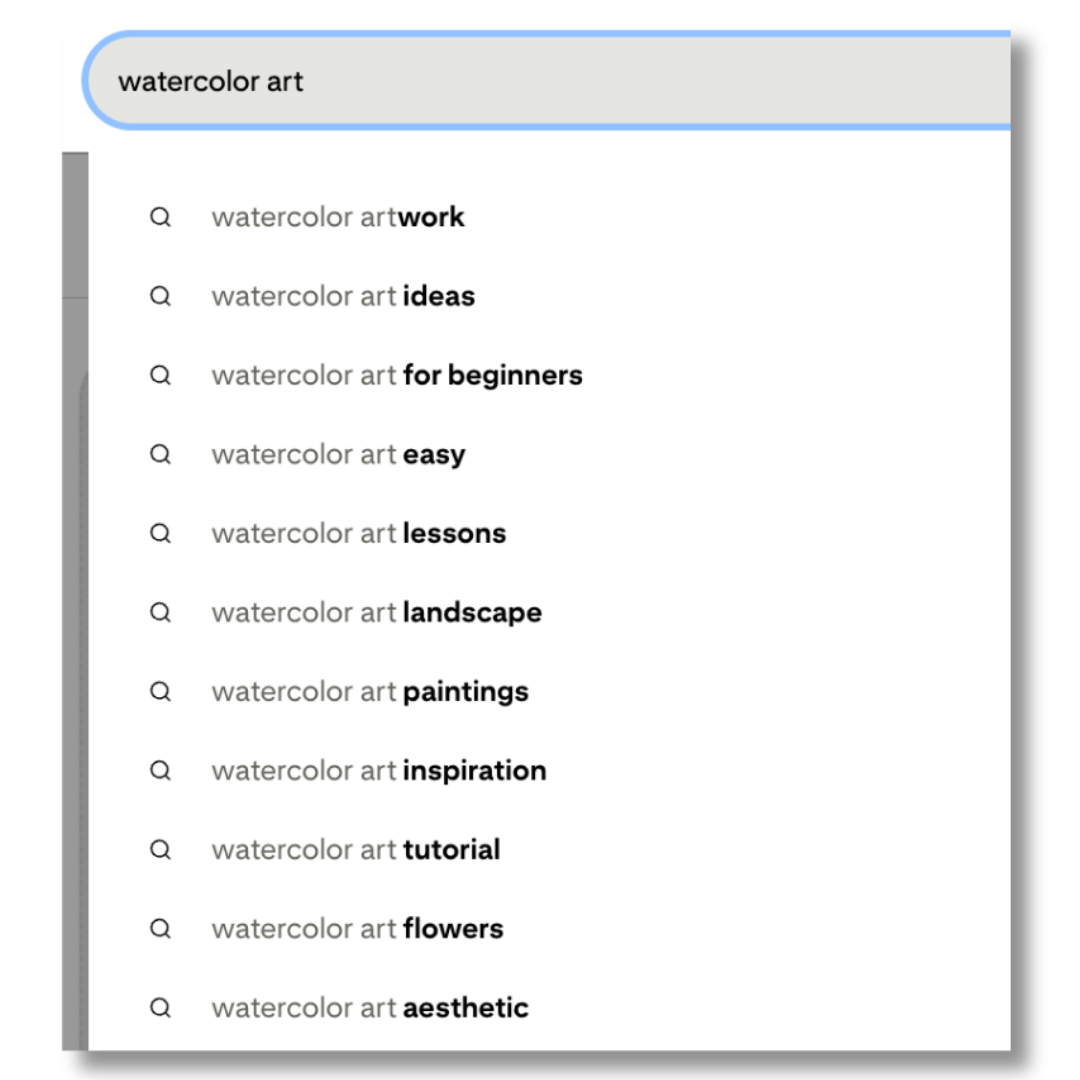
Those are your keywords.☝️
For keyword research tools and strategy, read: Pinterest SEO for Artists
What Pinterest Can (and Can’t) Do for Your Art Business
Let’s be clear, Pinterest is really great at driving traffic, and it has limits, too. Here’s the truth:
Pinterest is excellent for:
- Driving consistent, long-term website traffic
- Getting discovered by people who don’t already know you exist
- Building an audience for your email list
- Selling art prints, downloadable art, and anything with a clear product page
- Positioning yourself as an authority in your art niche
Pinterest works less well for:
- Immediate sales (it’s a slow burn, not a flash sale platform)
- Very local artists who rely on in-person buyers (though it can still help)
- Artists without a website, you need a destination for the traffic to land on
- High-ticket originals with no supporting content or relationship-building in place (though it can support that sales process with blog content)
Want to do this yourself, but with a clear roadmap?
The Pinterest Primer is a DIY resource built specifically for artists and creative business owners. It walks you through profile setup, board strategy, Pin creation, and keyword research in a step-by-step format, so you’re not guessing or piecing together advice from a dozen different sources.
The Pinterest Primer is a foundational guide built for beginners and perfect for you if you’ve been absent from Pinterest for a while.
If you’d rather have someone handle the Pinterest strategy and management for you, Pinterest account management for artists is available too. Learn more about working together →
How to Promote Art on Pinterest: Going Beyond Single Pins
Most artists think of Pinterest as “upload an image, add a description, done.” But if you want to promote art on Pinterest in a way that builds momentum, you need to think in terms of content clusters.
A content cluster is a group of related boards, Pins, and blog posts that all link to each other to create a web of relevant content that reinforces your topic authority with Pinterest’s algorithm.
Example content cluster for a botanical watercolor artist:
- Core blog post: “How to Decorate with Original Watercolor Art” → links to your shop
- Supporting Pin 1: “5 Ways to Style a Botanical Watercolor in Your Living Room” → links to blog post
- Supporting Pin 2: “Behind the Painting: How I Create Botanical Watercolor Art” → links to process post
- Supporting Pin 3: “Botanical Watercolor Art Print Shop and New Additions” → links directly to shop
- Supporting blog post: “How to Choose the Right Art Print Size for Your Wall” → links to both the core post and your shop
Each piece supports the others. Pinterest sees your account consistently publishing content about botanical watercolor art, and over time, your Pins start ranking for those terms.
How to Drive Art Website Traffic from Pinterest
Traffic from Pinterest comes in two forms: direct traffic (a.k.a. Click-Throughs are when someone clicks your Pin in the feed, which opens the Pin and then they click through to your site) and assisted traffic (someone discovers you on Pinterest, doesn’t click, but remembers your name and searches for you later on Google).
To maximize direct traffic:
- Every Pin must have a URL. This seems obvious but it’s frequently missed, especially when uploading directly from mobile.
- The landing page must match the Pin. If your Pin says “Shop Botanical Prints,” the page it links to should show botanical prints, not your homepage or another page featuring textiles.
- Make your landing page easy to navigate. Someone arriving from Pinterest is warm but not committed. A clean page with a clear next step, such as buy, inquire, or subscribe, will convert much better than a cluttered or confusing page.
- Track your Pinterest traffic in Google Analytics. Go to Acquisition → Traffic Acquisition → filter by “Pinterest” to see which Pins are driving real visits and what those visitors do when they arrive.
A Word on Pinterest for Artists Who Sell Originals (Not Just Prints)
If you sell original one-of-a-kind pieces, for example, paintings, sculpture, ceramics, or textile work, Pinterest can absolutely work for you, but the path is slightly different from that of print sellers.
What works well:
- Process videos and step-by-step “how it’s made” content builds connection and trust
- Blog posts that tell the story behind a piece (inspiration, materials, meaning) warm up buyers before they inquire
- Portfolio boards organized by series, style, or medium help collectors understand your body of work
- “Available now” boards with clear pricing create urgency without feeling pushy
What to avoid:
- Linking to a “sold” piece with no alternative, always redirect sold work to a similar available piece or a commissions page
- Vague Pins with no price, no link, and no clear next step
Ready to turn Pinterest into a real traffic source for your art business?
If managing Pinterest consistently feels like one more thing on an already full plate, Pinterest account management for artists might be exactly what you need. I handle the strategy, the Pins, the keyword research, and the consistency, so you can focus on making the work.
Not sure which next step is best for you? Please feel free to contact me directly or book a discovery call.
Pin to your Art Marketing board to come back to ↴
Frequently Asked Questions: How to Sell Art on Pinterest
Yes, Pinterest works differently from a marketplace like Etsy or Society6. Pinterest is a discovery platform: it drives people to your website, where the actual sale happens. Artists who use Pinterest consistently to drive traffic to their shop or portfolio regularly convert that traffic into print sales, original purchases, and commission inquiries. The key is having a clear path from Pin to purchase on your website.
Pinterest is a long-game platform. Most artists start seeing meaningful traffic growth within 3–6 months of consistent, strategic Pinning. Unlike Instagram, where content disappears quickly, Pinterest Pins continue circulating in search results for months or years, so the effort you put in today compounds over time.
No. Pinterest is a search engine, not a follower-based social platform. Your Pins can surface in search results regardless of how many followers your account has. Followers matter less than keyword optimization and consistent publishing.
Art prints and digital downloads tend to see the fastest Pinterest results because they have a clear product page and simple purchase path. Original paintings, ceramics, textiles, and illustration work also perform well, especially when supported by blog content that tells the story behind the work and builds buyer trust. Abstract art, botanical art, minimalist prints, and home decor-oriented art consistently trend well on the platform.
Aim for 3–7 Pins per week. Consistency matters more than volume. Pinning 5 times a week every week will outperform Pinning 20 times in one week and then going quiet. Use Pinterest’s built-in “native” scheduler or a tool like Tailwind to spread your Pins throughout the week.
Standard Pins, still-image Pins with a destination URL, remain the most effective format for driving website traffic and sales because they link directly to your shop or portfolio. Pinterest has simplified Pin creation: you now just click “Create Pin” to upload an image or video. For selling art, focus on single-image Pins with strong titles, clear descriptions, and a destination URL every time.
Pinterest works best when you have a destination to send traffic to. If you don’t have a website, start with a simple portfolio page (even a free Squarespace or Carrd site works) or link to your Etsy shop in the interim. Building even a basic website should be a near-term priority; your email list and your shop both live there, and Pinterest is most powerful when it’s feeding a destination you own.
The core difference is longevity and search intent. An Instagram post typically gets most of its engagement within 24–48 hours, then disappears. A Pinterest Pin can continue surfacing in search results for years. Instagram is great for community building and real-time engagement; Pinterest is better for long-term traffic and discovery by people who don’t already know you. Most artists benefit from using both, with different content strategies for each.