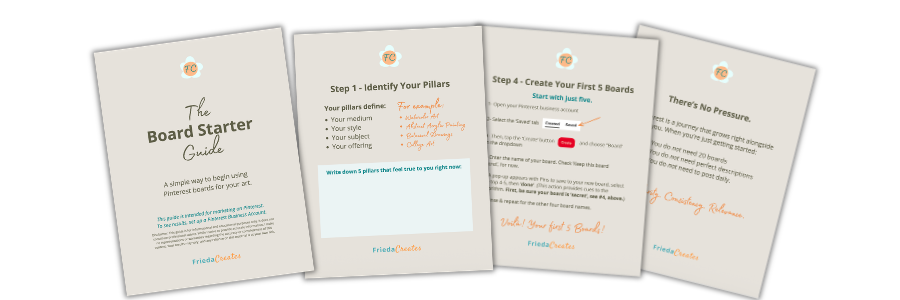
The Board Starter Guide is for artists who are just getting started with Pinterest, or anyone who’s been pinning for a while but isn’t sure they’re doing it right.
Are you wondering:
- What boards should I even create?
- How many do I need?
- Am I doing this right?
You are not alone.
These are the questions I hear most often from artists who are new to Pinterest, and frankly, from artists who have been on the platform for years but never felt quite sure their boards were set up correctly.
Actually, your Pinterest boards are one of the most important parts of how your work gets discovered. Not your follower count. Not how often you post. Your boards.
This guide will walk you through creating your first five boards with clarity and intention. No overwhelm. No guesswork. Just a simple, repeatable process that works.
Want the 14-page downloadable version now? Get The Board Starter Guide here.
First: Why Pinterest Works Differently
Before we get into the steps, one thing is worth knowing.
Pinterest is not social media.
On Instagram or Facebook, your content lives in a feed that moves fast and disappears quickly. On Pinterest, your content lives in a searchable index that compounds over time. A Pin you create today can drive traffic to your website six months, or six years, from now.
Pinterest works like a visual search engine. Similar to Google that uses words on a page to decide what a website is about, Pinterest, instead, uses your board names, board descriptions, and Pin content to decide what your account is about and who to show it to.
Your boards help Pinterest understand three things:
- What your content is about
- Who to show it to
- When to surface it in search
Boards are containers that hold meaningful information.
When your boards are named clearly and described well, Pinterest can place your work in front of the right people, the ones who are already searching for art like yours. When boards are vague or off-topic, Pinterest has to guess. And guessing means missed opportunities.
Step 1: Identify Your Pillars
Before you name a single board, start with your pillars.
As an artist, your pillars define what you make, how you make it, and what you offer. They are the core themes that run through your work and your creative business.
A pillar might be:
- Your medium — watercolor, acrylic, oil pastel
- Your style — abstract, botanical, figurative, landscape
- Your subject — florals, portraits, nature, architecture
- Your offering — original paintings, prints, commissions, tutorials
Take a few minutes and write down five pillars that feel true to you right now. Don’t overthink it. These will become the foundation of your first five boards. The beautiful thing is that boards grow and can evolve just as your work does.
Here are examples of pillars:
- Watercolor Art
- Abstract Acrylic Painting
- Botanical Drawings
- Art for the Home
- How to Sell Art Online
Step 2: Search Your Pillars on Pinterest
Here’s where your board names get their SEO power.
Open Pinterest and type each of your pillars into the search bar, one at a time. As you type, Pinterest will automatically suggest related search terms. These suggestions pack a punch: they show you exactly what people are already searching for on the platform.
For example, if you type “watercolor” into Pinterest search, you might see:
- watercolor art
- watercolor paintings
- watercolor ideas
- watercolor art for beginners
- watercolor landscape
These are your keyword options. Choose the ones that most accurately describe your work and that feel like a natural fit for what someone searching for your art might type.
Write down the best keyword match for each of your five pillars. These become your board names.
Step 3: Turn Your Pillars Into Board Names
Now the pillars become the boards.
It’s that easy. If your pillar is “Watercolor Art,” your board name is “Watercolor Art.” If your pillar is “Abstract Acrylic Painting,” that’s your board name.
The key rule when naming your boards:
Choose clarity over cutesy.
A board called “Color Dreams” tells Pinterest nothing. A board called “Original Watercolor Paintings Floral Prints” tells Pinterest exactly what’s inside and where it belongs in search results.
Your board names are keywords. They are signposts that help Pinterest’s algorithm find you and place your work in front of the right people. Clever names feel personal but searchable names get found.
Step 4: Create Your First Five Boards
Ready to build? Here’s exactly how to do it on Pinterest:
1. Open your Pinterest business account (Don’t have one yet? Set up a free Pinterest Business Account before you begin, it gives you access to analytics, product tagging, and other tools artists need. You can find out how, here.
2. Select the Saved tab on your profile
3. Tap the red Create button and choose Board from the dropdown
4. Type in your board name. Before you make it public, check Keep this board secret, you’ll make it visible once it’s set up properly
5. A pop-up will appear with suggested Pins to save to your new board. Select 4–5 that feel relevant then tap Done. (This gives Pinterest its first signals about what your board is about, think of it as seeding the algorithm with context. Just make sure your board is still set to secret at this point.)
6. Repeat for all five boards
Voilà! Your first five boards.
Step 5: Write Your Board Descriptions
This is the step most artists skip and it’s one of the most valuable things you can do for your Pinterest SEO.
Pinterest allows up to 500 characters in each board description. That’s 500 characters of searchable, indexable language that tells Pinterest, and anyone who finds your profile, exactly what your board contains, who it’s for, and why it matters.
A strong board description has three parts:
1. What the board is about — state this clearly using your primary keyword early in the first sentence
2. What content is found here — describe the kinds of Pins, artwork, or resources someone will find
3. Who it’s for — name your audience directly: artists, art lovers, collectors, beginners
Here’s an example for a Watercolor Art board description:
“This board is about watercolor art and watercolor paintings inspired by nature. Explore original watercolor landscapes and flower studies with rich color palettes and layered techniques. Perfect for art lovers looking for original work for a gallery or living room wall and for artists exploring watercolor painting ideas and inspiration.”
Notice how it reads naturally, uses the keywords from your earlier search, and clearly tells both Pinterest and the pinner what they’ll find here.
Use the keywords from Step 2 to inform your descriptions, weave them in as you would in natural conversation, not as a list.
Step 6: Add Your Description and Make Your Boards Public
Once you have your description written, here’s how to add it:
1. Open your Pinterest business account
2. Go to the Saved tab and open one of your new boards
3. Click the three dots on the right side of the board and select Edit board
4. Paste your description into the description field
5. Uncheck the box next to Keep this board secret
6. Tap the red Done button
7. Repeat for each of your five boards
Your boards are now ready for Pins.
One More Thing: Keep Your Account Focused
As you build, you may have existing boards that don’t relate to your art or creative business, such as, personal interests, recipes, and home decor inspiration saved years ago.
Here’s simple, but important advice: make them secret.
Keeping off-topic boards secret gives Pinterest a clear, uninterrupted path to understanding what your account is about. The more focused your public boards are around your art and your pillars, the more confidently Pinterest can categorize your work and surface it in relevant searches.
You don’t have to delete anything. Just hide what doesn’t serve your creative business goals.
There’s No Pressure
Pinterest is a journey that grows right alongside you.
When you’re just getting started:
- You do not need 20 boards
- You do not need perfect descriptions
- You do not need to post daily
Five focused boards, described clearly, with on-topic Pins added consistently, that’s a recipe for success and enough to create real momentum.
Clarity. Consistency. Relevance.
These three things, applied consistently and over time, are what build a Pinterest presence that works.
Pin to your Art Marketing or Pinterest for Artists boards for later ⤵️
What’s Next
Your boards are the foundation. Pins are what bring them to life.
Once your first five boards are set up, focus on one thing: adding on-topic Pins such as your artwork, your process, and your blog posts to the boards where they belong.
If you’re ready to build your full Pinterest strategy from the ground up, the Pinterest Primer course walks you through every step, from account setup to creating Pins that attract your ideal collector.
Want to understand Pinterest? Discover Pinterest Primer, a Beginner’s Course for artists on how to use Pinterest to market your art
For Artists who want Pinterest Marketing done for you, Off-Your-Plate Pinterest Business Account Management is just for you.