Can artists sell art on Pinterest? Yes, especially when your Pinterest business account is set up right.
Pinterest functions as a visual search engine where artwork can be discovered months or even years after it is posted. In this guide, you’ll learn how artists use Pinterest SEO, boards, and Pins to attract collectors, drive traffic to their websites, and ultimately sell art online. For the complete strategy guide, read: How to Sell Art on Pinterest: A Practical Guide for Artists
Selling art on Pinterest requires having a Pinterest account set up to receive business. Below are the important first steps for Setting Up Your Pinterest Business Account, and the recommended steps for Setting-Up-Shop on Pinterest.
Sprinkled within this article is the topic of search engine optimization. After all, Pinterest is a visual search engine and applies similar principles used by Google to deliver search results, like keywords. As with Google, keywords are necessary for guiding people to your content.
Is Pinterest Worth It?
Pinterest works differently from most social platforms. Instead of focusing on followers, Pinterest organizes content through search. When artists create keyword-focused boards and Pins, their artwork can appear in Pinterest search results and even in Google Image search. This allows collectors and art buyers to discover artwork organically.
Need a little motivation for monetizing your Pinterest account?
The shift to online shopping has opened real doors for artists. Collectors and art buyers are increasingly discovering and purchasing work online, and Pinterest sits right at the intersection of that browsing and buying behavior.
It stands to reason that selling art online can be viable, too. But here’s the thing, you’re not the only artist with the same idea. So how do you and your artwork stand out? Short answer:
How Pinterest SEO Helps Artists Get Discovered
When your Pins, boards, and descriptions are structured clearly, Pinterest can understand what you create and show your work to people actively searching for it. For a full guide to how this works, read Pinterest SEO for Artists: How to Get Your Work Found.
How Pinterest Affects Your Google Search Rankings
Yes, it really does. Google uses data from Pinterest to populate its text search results, or SERPs (Search Engine Results Pages). As more of your Pinterest content is engaged with, such as your Pin being saved, the more your content is exposed to new users with more links to your website being cast out to your target audience. Over time, the more Pinners clicking through to your website indicates to Google that your traffic is growing, which in turn affects the success of your content ranking.
More Reasons to Sell Art on Pinterest
- Simply put, Pinterest drives traffic to your website so you can grow your email list and nurture new leads
- People on Pinterest have the intent to purchase. Pinterest users spend twice as much on shopping every month compared to non-Pinners. source
- Content, a.k.a ‘a Pin’, lives longer on Pinterest. Pins keep working for you months, even years, after being posted. Your Pins don’t get lost in the scroll, never to be seen again.
- Pinterest expands the reach of your products (and services). Expand the views on your artwork by leveraging SEO strategies, creating engaging evergreen content, using keyword intel, and pinning consistently to relevant Boards.
Sounds wonderful, right?!
What Artists Need Before Selling Art on Pinterest
Before you, as an artist, can expect to sell your work on Pinterest, let alone grow web traffic and build an active following, the steps below need to be in place. It may seem overwhelming to read through all this material, especially if you’re new to Pinterest, but they’re just steps. Take one at a time, and soon enough you’ll be at the end of the list.
Want a calm, step-by-step way to learn this whole system? Pinterest Primer is a self-paced course built specifically for artists starting out on Pinterest.
How to Set Up Your Pinterest Business Account to Sell Art
Before you can sell art on Pinterest, your account needs to be optimized so Pinterest understands your artwork and your website.
Whether or not you want to set up shop, the steps outlined below are an integral part of setting up your Pinterest account for business, especially if you want a high-performing account that directs traffic to your website.
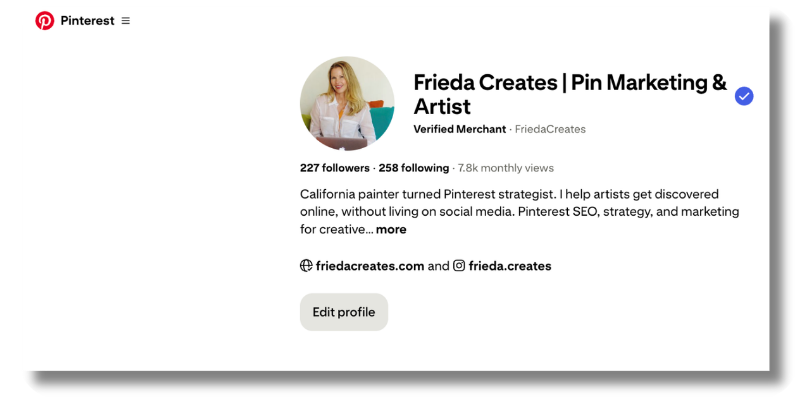
If you want to expand brand awareness, grow your email list, and draw more eyes to your art, follow these steps:
- Create a Pinterest Business Account, illustrated here. This link also shares how to convert your personal account to a business.
- Optimize your Public Profile for success. That is, fill in these blanks under Settings after you’ve set up a business account.
- Upload a Profile Photo. Use a clear bright picture of you, that you like, that you want people to see. A logo can work here, too.
- Your Name is a chance to highlight your business name with how you help.
- Craft your About (aka Bio). You have 500 characters to work with so include keywords in your description. Write sensible sentences. Keyword stuffing is an outdated tactic that doesn’t have the effect it once did.
- Include your Website URL
- Create a Username that is consistent across your other social platforms
- Include your Email address
- Optional: fill in your pronouns and physical address (which is helpful if you have a brick & mortar)
- Claim your website. Navigate to the left menu column under Settings, then scroll to and click ‘Claimed Accounts’. Select Claim to add your website URL. Part of claiming your website is adding an HTML tag to your website. Pinterest provides instructions for different website providers and provides details about claiming your website, here. **
- Enable Rich Pins. There are three types of Rich Pins: Article, Product, and Recipe. There is an App Rich Pin, too, but this is accessible only through Promoted Pins (Ads). Rich Pins are an important feature on Pinterest because a Rich Pin syncs information from your website to the organic Pin you’ve created. In other words, when you update your blog those updates will be reflected in the linked Pin, too. Here are two resources to help you with this step:
- Pinterest. It seems natural to go to the source. Even so, it can be hard to follow. If this is true for you then I highly recommend this next resource.
- Simple Pin Media’s Complete Guide to Rich Pins on Pinterest
- Website Add-ons. These are the Save and Follow Buttons that help to increase your reach on Pinterest. Take advantage of these features to help expand your reach. Try your hand at adding these to your website or hand them off to your web developer. Tap here for instructions. There are five add-ons, two are buttons & three widgets:
- Save Button – This allows visitors to your website to save your content
- Follow Button – This website link invites new followers to your Pinterest Account
- Pin, Board, & Profile Widgets – These are actual links to, you guessed it, a Pin, Board, or Profile Page.
** While you’re in the Claimed Accounts section, you may notice that you can install the Shopify App. If you have Shopify, go ahead and follow the prompts. Stay tuned for more on this in the Setting Up Shop section below.
Now That You Have A Pinterest Business Account, What’s Next?
Once your Business Account is set up, it’s time to make Pins and Boards which are the dots that connect your Pinners to your Pinterest profile and eventually to your website. There is power in the picture. An Image holds a lot of weight for the algorithm, you could say it’s the most important piece of content.
How Pinterest Understands Your Artwork
Pinterest has become remarkably good at recognizing what’s inside an image. Its visual search technology can identify elements such as:
- the medium (oil, watercolor, glass, textile)
- subject matter (portrait, abstract, botanical)
- color palette and texture
This means clear, well-lit images of your artwork matter more than ever. When Pinterest can easily recognize what your image contains, it becomes much easier for the platform to show your Pins to people searching for that type of art.
For artists, this is good news. You don’t need complicated captions or trendy tricks. A strong image that clearly shows your artwork, paired with a descriptive title and board, helps Pinterest understand exactly where your work belongs. This is Pinterest SEO in action. Pinterest SEO for Artists walks through every element, boards, titles, descriptions, and destination pages, with artist-specific examples.
And when Pinterest understands your artwork clearly, it can place your Pins in front of people who are already searching for art like yours.
After all, Pinterest is a visual search engine and why selling art on Pinterest is a match made in heaven. However, the text is vital, too, especially in the form of thoughtfully researched keywords.
Learn how to research, and where to place, keywords on Pinterest here: How to Use Keywords on Pinterest.
Create Content
Content for Pinterest marketing comes from your website. If you’re wondering if your artwork counts as content? Well, yes it sure does! Sharing Pins featuring your artwork will definitely drive traffic to your website.
Creating content also includes writing. Writing blogs will reinforce your message and is a valuable complement to showcasing your artwork. Furthermore, writing content not only nurtures and serves your dream client but is an integral part of search engine optimization. Blogs can help your artwork get noticed and lead to increased sales. Frankly, learning about content marketing was a big “Aha!” moment for me.
If you don’t have a blog, don’t let this stop you!
If you don’t have a blog or newsletter don’t let this stop you. Start creating Pins with your artwork that link back to your website. Make Pinterest work for you by getting started now. So go on, activate, and enhance your Pinterest business account for SEO by including these next steps in your daily or weekly routine.
Optimize Your Pinterest Account and Pin Daily
- Add a Cover Photo to your profile page. This large rectangular image is a wonderful opportunity to showcase your artwork.
- Create Boards. Starting with 5 is fine when you’re just beginning on Pinterest. Boards act as topical containers for your content. When boards are clearly named, such as “Contemporary Botanical Watercolor” or “Abstract Landscape Paintings” Pinterest can better understand your work and connect it with people searching for those subjects.
- Create captivating original content, i.e. Fresh Pins. Pinterest favors new visual content, meaning new images, new designs, or new ways of presenting your work. Even if the artwork already exists on your website, creating a fresh Pin image gives Pinterest new content to index and share.
- Be sure Pin images meet the recommended ratios.
- Write strategic Pin descriptions and Pin titles using keywords. Need examples? Pinterest SEO for Artists has before-and-after Pin title examples built specifically for artists.
- Include text overlay on images, and use keywords.
- Write strategic Board descriptions and use keywords.
- Be concise when naming your Boards. Stay clear of cutesie words, just the facts ma’am.
- Pin consistently. Pin consistently rather than constantly. When you’re getting started, a few thoughtful Pins each week, linked to your artwork, blog posts, or shop pages, are enough to build momentum over time.
- Take advantage of the latest Pinterest feature. Pinterest continues to experiment with new Pin formats such as short video Pins and step-by-step storytelling Pins that show process. Artists can use these formats to share studio moments, progress shots, or how a piece comes to life.
- Follow other accounts.
- After a few months, build to posting one Pin a day. Uncover how with A Simple Pinning Strategy: Case Study
Impressions and followers grow when you’re consistently pinning.
Need more help with any, or all, of the above? Learn more about my Pinterest Services. Prefer to learn at your own pace first? Pinterest Primer covers all the essentials in one place.

Steps for Setting Up Shop to Sell Art on Pinterest
If you’re like me, I would have already skipped down to this section. I wouldn’t blame you. There’s not a lot of straight talk out there to clearly illustrate the steps for setting up shop on your Pinterest account. Even at the source, using Pinterest’s Help Guide can be darn right daunting.
Once you have Set Up Your Pinterest Business Account, and are actively Pinning, you’re ready to monetize Pinterest for selling your art.
Each paragraph below outlines the steps for setting up a shop on Pinterest, especially suited for those of you with a WordPress site. So, these next steps, shared below, are based on using the WooCommerce Plugin on a WordPress website.
Step 1 – Use WooCommerce To Set Up Shop
WooCommerce is an Approved Pinterest Partner, which makes it a compatible platform for growing your business using Pinterest. In April 2022 the Pinterest for WooCommerce extension was introduced so, having a WordPress website, I wasted no time in putting it into action. Like Shopify, WooCommerce is an eCommerce platform that integrates with Pinterest making setting up shop a whole lot easier.
Like Shopify, WooCommerce is an eCommerce platform that integrates with Pinterest, making setting up shop a whole lot easier.
Many artists now connect Pinterest to their shop through WooCommerce, Shopify, or other catalog integrations that automatically create product Pins from their website.
Learn about WooCommerce, here.
Step 2 – Connect Pinterest & Your Website
Given that you have a WordPress site set up with WooCommerce, and that you have completed setting up your webshop with your artwork, you’re ready now to connect Pinterest with your website. To do this you need to install the Pinterest for WooCommerce Plugin.
With the Pinterest for WooCommerce Plugin you can:
- Sync your WooCommerce catalog to Pinterest
- Add the Save to Pinterest button so visitors to your website can create full-featured Pins of your products, further expanding the reach of your artwork
- Install the Pinterest Tag
If you’ve been humbled at the thought of setting up a shop on Pinterest, using the Pinterest for WooCommerce Plugin makes it a whole lot easier!
Learn how to Install the WooCommerce for Pinterest Plugin, here.
Step 3 – Become A Verified Merchant
Being a Verified Merchant on Pinterest has its benefits. The blue checkmark that appears on your profile lets people know that you’ve been vetted and adds to that all-important trust quotient for selling art on Pinterest. Not only that but being verified by Pinterest
- Makes your product Pins eligible for distribution within Pinterest’s shopping experiences.
- Eligibility for exclusive features like merchant details
- Price and availability information shows up automatically on all your product Pins.
Learn about all the benefits and how to become a Pinterest Verified Merchant, here.
Be sure to learn about and follow Pinterest’s Merchant Guidelines.
The Benefits and Requirements of Setting Up Shop
Setting up shop on Pinterest enables you to create Product Pins that help sell your artwork. Product Pins are a type of Rich Pin that highlights the featured product’s (including artwork) title and description along with pricing info and availability. Because Product Pins are created automatically from the ingestion of your product catalog (known as data source on Pinterest) from your website there are product data requirements that need to be in place on your website in order to have a successful ingestion, or product catalog upload to Pinterest. The seven required fields are:
- id
- title
- description
- link
- image_link
- price
- availability
Having an eCommerce site, like WooCommerce or Shopify, helps to simplify this process. But there are alternatives to these eCommerce platforms as shared in the next section.
Alternatives to Using WooCommerce or Shopify
There are alternatives to using an eCommerce platform like WooCommerce or Shopify. You can upload a product catalog to Pinterest using a data source integration, or manually. Discover other integrations, and how to get started with Catalogs here.
Share your art with the world!
Getting Into the Pinterest Ad Game.
Pinterest works more like a long-term search engine than a social feed. It can take three to six months for Pins to gain traction, but once they begin ranking, they can continue sending traffic to your website for years. The foundation for that long-term ranking is Pinterest SEO, here’s where to start.
Start today by creating an active Pinterest Business Account.
With the steps outlined in this article, you’ll be well prepared to run successful ad campaigns on Pinterest in the future. According to Pinterest, ads deliver 2.3x more efficient cost per conversion than social media ads, and 2x the return on ad spend for retail brands.
Honestly, I haven’t dipped into the ad game for my artwork yet. But I will. So stay tuned for more on the effectiveness of running ads to sell artwork.
Ready to go beyond setup? Read the full strategy guide: How to Sell Art on Pinterest
Pin to your Pinterest Business Account Board for Later ⤵️
Let’s stay in touch
Share how your setup goes in the comments, below.
Hang out with me on Instagram for quick Pinterest tips and encouragement @Frieda.Creates.
Follow me on Pinterest.